
This is the first of two posts on a DMCA-themed phishing kit we've been looking at recently. The kit goes after creator accounts on platforms that issue copyright complaints. This post covers the front door: the lure page, the anti-analysis layer, and the kit's lifecycle up to the point where it asks the victim to sign in with Google. Part 2 will cover what happens when they click that button.
We came across this kit on a domain serving a "Copyright Claim Review" page styled to look like a YouTube creator-tools workflow. It was sat on some infrastructure we'd associated with some Tycoon2FA activity and stood out as something a bit different. The further we delved the more interesting it became, so we thought we'd write about it.
The theme is the one I imagine every YouTuber dreads: a copyright complaint has been filed against your channel; sign in with the Google account associated with the channel to view and contest it. It's a strong lure. The fear of monetisation loss is real, the workflow is plausible, and the kit makes a sustained effort to make every visual detail look convincing whilst also employing a number of interesting evasion techniques.
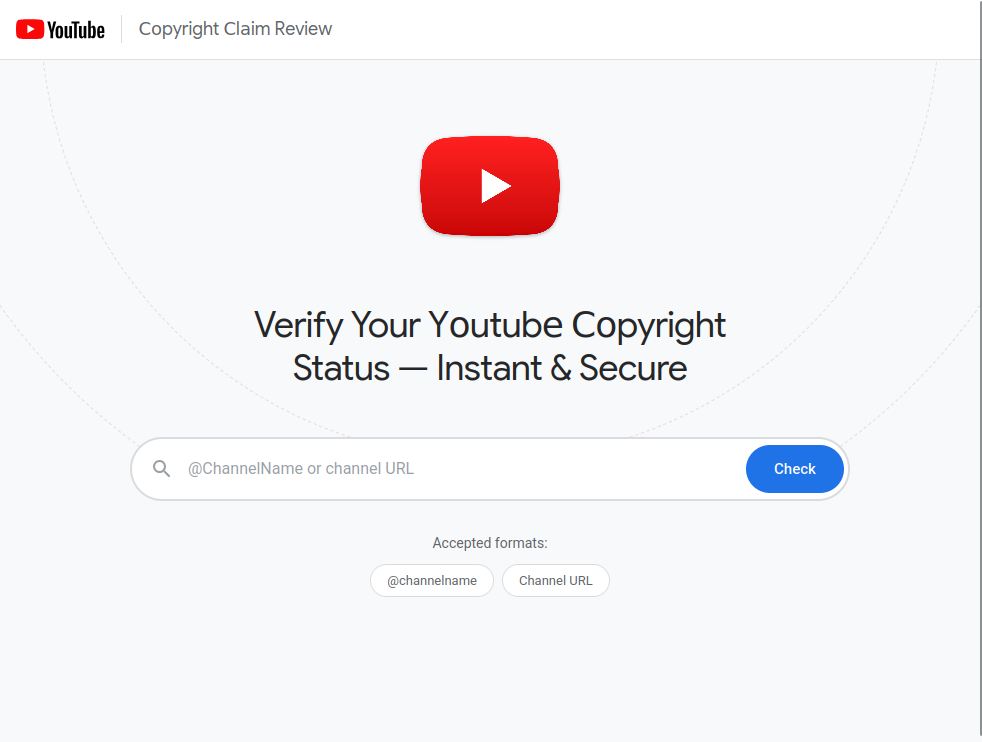
We start with this landing page:
What makes this kit interesting isn't any one trick. It's the layering. Each stage is doing a bit of social engineering, a bit of evasion, and a bit of telemetry, and the seams between them are clean enough that it took a couple of analysis passes to map the whole pipeline.
Getting to readable code
Everything below is the kit's own JavaScript, but it doesn't ship looking like this. The page's inline bootstrap is a hand-rolled XOR loader using the key "40449f67" to obscure the URLs of the scripts it pulls in. Those scripts are themselves obfuscated with obfuscator.io at a fairly aggressive setting - RC4-encrypted string array, base64 layer on top, the array shifted at runtime via a checksum-keyed IIFE, plus the usual control-flow flattening and dead-string injection. Numeric literals are everywhere replaced with hex arithmetic like 0x1*0x7d3+-0xe*-0x229+-0x2610 so you can't grep for constants.
The good news is that obfuscator.io output is well-understood, and webcrack handles it cleanly. The 61 KB main script comes out as about 24 KB of readable JavaScript on the other side. From there it's a manual annotation pass to figure out which DOM elements are which (every ID in the source is a random hex blob, e.g. el-d78e3, el-c2751), but the logic is all there. Everything quoted below is from that deobfuscated output.
The lure
The landing page asks for a channel URL, @handle, or video link. The first surprise is that it won't do anything at all unless the URL contains a specific query parameter:
if (!urlParam("rel")) {
  errorEl.textContent = "This service is available only for invited YоuTubе creators. " +
                        "Please use the link provided in your nоtifiсation.";
  return;
}
Without a rel parameter, when you submit a channel name you get the red error displayed stating:
"This service is available only for invited YоuTubе creators. Please use the link provided in your nоtifiсation"
There are no network request to validate the channel name or URL, nothing leaves the browser, your request is validated against your rel parameter, this is what ties a session to a particular target. The phishing email contains the full URL with rel=... baked in. Without it, the page is inert. This is a sensible bit of design from the operator's perspective: it keeps researchers and crawlers from triggering anything useful, and it means the kit only progresses when someone has actually clicked the lure email.
There's a second thing happening in that error string, which you may or may not have spotted: four of the characters in it aren't Latin. Look at "YоuTubе" - the о and the е are Cyrillic, codepoints U+043E and U+0435. Same with the о and с in "nоtifiсation" - U+043E and U+0441. They render identically to their Latin equivalents in almost every font, but they are not the same characters, and a text-based detection looking for "YouTube" or "notification" by literal string match will see neither.
This isn't isolated to the error message. The kit uses Cyrillic homoglyphs throughout - in button labels, in the page title, even in internal string comparisons. For example, the function that parses a victim-supplied URL checks whether the input contains "youtube.com" like this:
if (q.includes("yоutubе.com") || q.includes("youtu.be"))
The first string in that check is y + U+043E + utub + U+0435 + .com. A real youtube.com URL from a victim's browser doesn't match it - Latin o is 0x6F, Cyrillic о is 0x43E. The kit's URL-parsing branch is therefore quietly dead code, and the kit always falls through to the generic search path instead. That's probably a bug, but the bug is harmless because the fallback works fine. It's a useful illustration of how thoroughly the homoglyph substitution has been applied, though - they've replaced the characters everywhere, including in places where doing so breaks their own logic.
Drawing logos at runtime
The YouTube logo and the Google "G" on the page aren't images. They're drawn at page load via HTML5 canvas:
function drawYouTubeLogo(canvas) {
  // ... rounded rect with linear gradient #ff1a1a -> #cc0000 ...
  var g = ctx.createLinearGradient(x, y, x, y + rh);
  g.addColorStop(0, "#ff1a1a"); g.addColorStop(1, "#cc0000");
  ctx.fillStyle = g; ctx.fill();
  // ... white play triangle ...
}
There are no .png, .jpg or .svg assets to fingerprint, no third-party CDN requests to log and no image hashes to match against. The same approach is used in other places too. This means that if you're hunting for these kits by hashing visual assets, there's nothing to hash.
Anti Debugging
Loaded alongside the main script is a small anti-analysis layer. Three things are worth pointing out about it.
First, it disables itself when it detects it's running inside another page:
var isFramed = false;
try { isFramed = window.self !== window.top; } catch (_) { isFramed = true; }
if (isFramed) return;
Essentially it is checking to see if it is the top-level page, if so then run. However, if it is being loaded inside another page (in an iframe), then do nothing. The reason is that the kit's own fake Google sign-in window - which we'll get to shortly - is itself an iframe loaded inside the lure page, and the operator doesn't want the anti-debug layer firing inside there. The side-effect is that any analyst who loads the lure page inside a wrapper page of their own doesn't get hit with the anti-debug controls.
The kit also stubs out twenty-two console.* methods and re-stubs them every two seconds in case anything tries to restore them. Anything the page logs is silently dropped.
There is also a debugger timing trap, which will catch you out the first time you stumble across it!:
setInterval(function () {
  var t0 = performance.now();
  debugger;
  if (performance.now() - t0 > 100) bail("debugger");
}, 1500);
The debugger statement is a no-op when DevTools isn't open. The moment you open DevTools, the browser pauses on that line. The next iteration of the timer notices that more than 100ms passed across the no-op statement, calls bail("debugger"), which fires a beacon back to the operator's server reporting the trip along with your User-Agent string, wipes the page DOM, and redirects to youtube.com.
There are a few other touches in this layer - F12, Ctrl+U, Ctrl+Shift+I/J/C and right-click are all caught and trigger the same bail in the same way, reporting back the trap type (e.g. "view source") along with your user agent.
Essentially, if you're going to analyse this kit live, do it inside a frame, or from saved HTML.
What the form actually does
Assume the victim arrives with a valid rel. They type their channel name. The kit's form handler doesn't talk to YouTube directly. Instead, it proxies everything through the operator's own backend, hitting endpoints like /api/yt/channels and /api/yt/search. This means that the operator is getting a log of which YouTube channels each victim is testing.
When the channel is resolved, the kit renders a believable copyright-complaint panel using real channel data (avatar, name, subscriber count) plus a fabricated "case ID" that looks like YT-CR-XXXXXXX and a fabricated received date 7-9 days in the past:
function makeFakeCase() {
  var d = new Date();
  d.setDate(d.getDate() - (7 + Math.floor(Math.random() * 3)));
  var n = "";
  for (var i = 0; i < 7; i++) n += Math.floor(Math.random() * 10);
  return { caseId: "YT-CR-" + n, date: d.toLocaleDateString("en-US", ...) };
}
Then there's a prominent "Sign in with Google" button (which uses the technique described earlier to draw the Google "G" at runtime). That's the handoff.
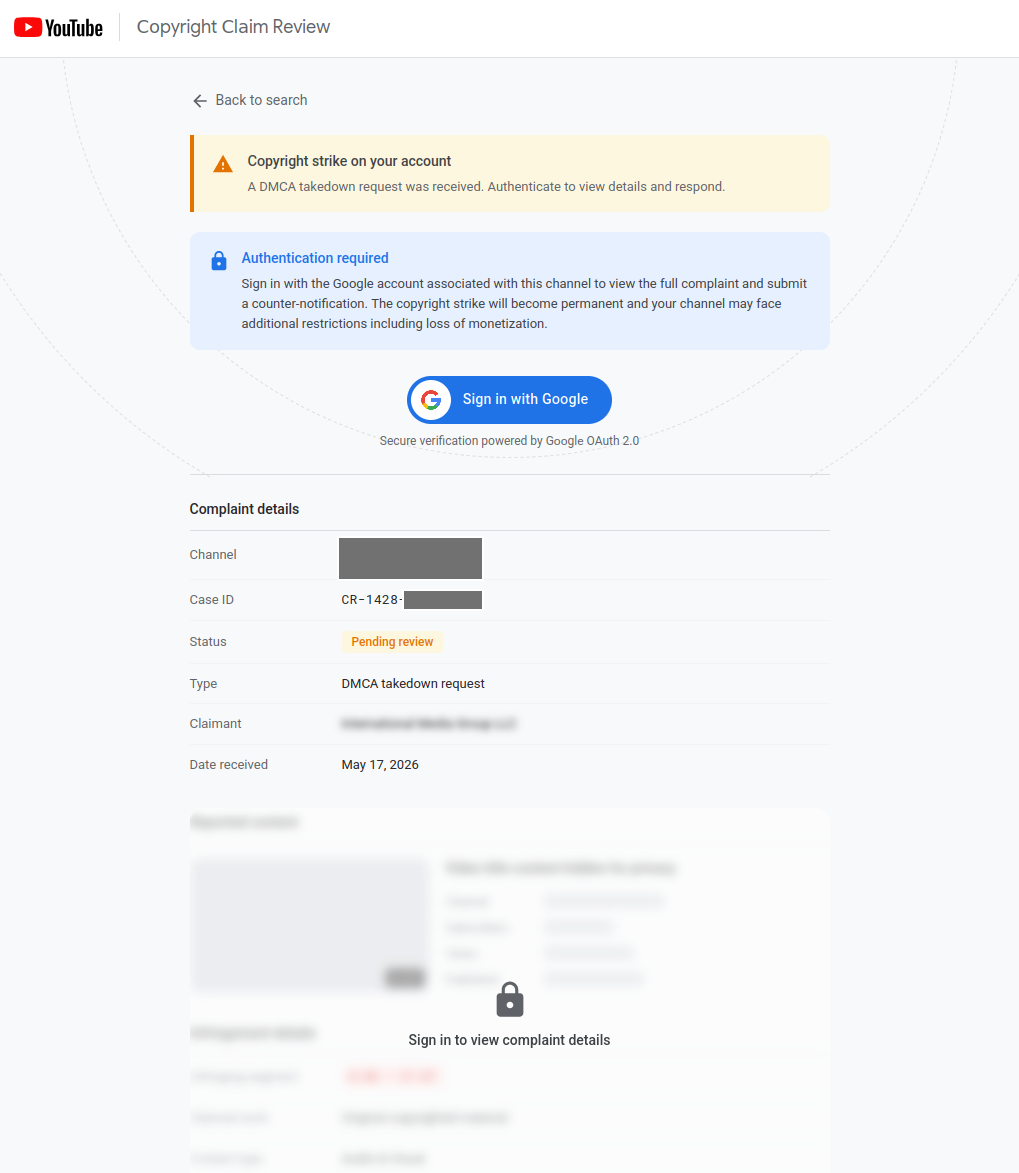
The panel calls out to a backend endpoint to fetch per-channel custom complaint text - so different victims see different complaint narratives tailored to their actual channel. We've had to hide it in the screenshot above, but next to the channel is the channel logo and name.
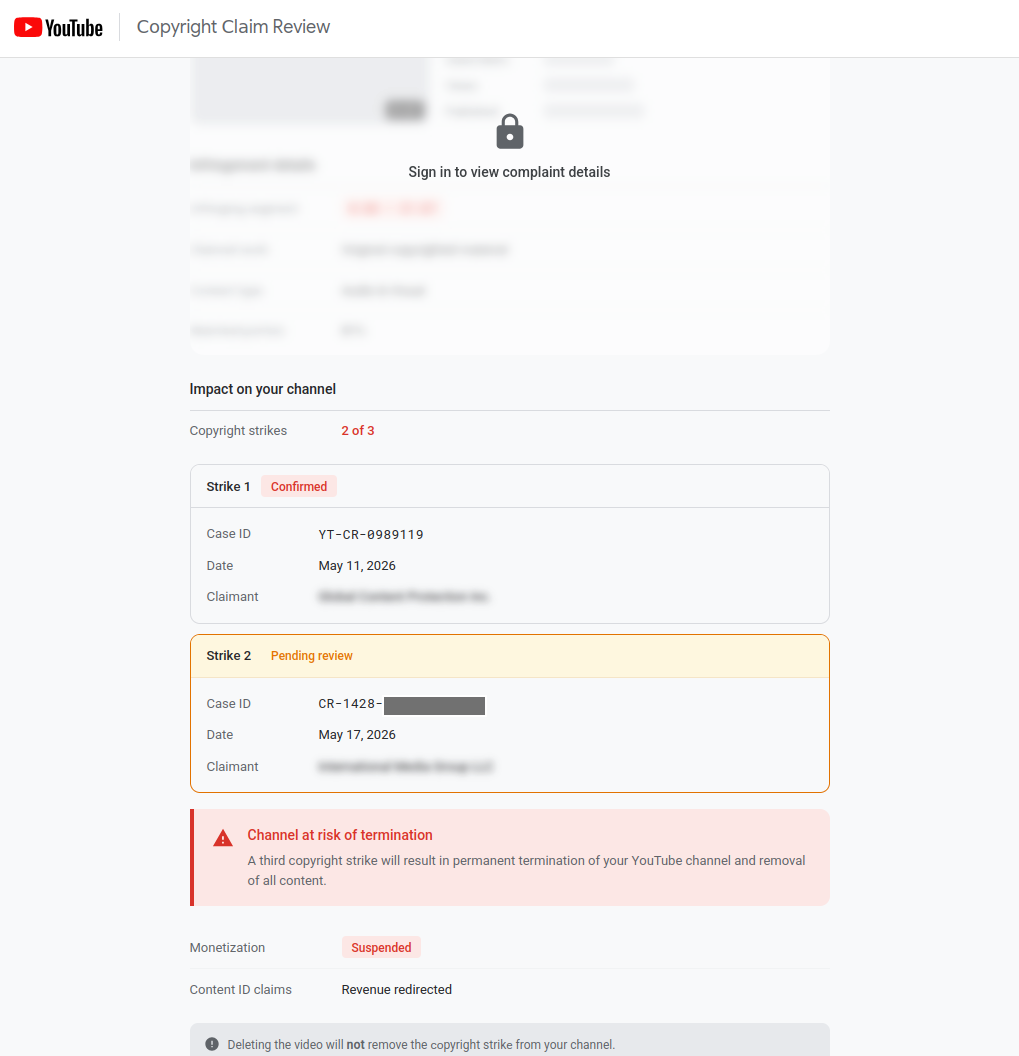
Scrolling further down the page is a timeline highlighting that monetization is suspended and further pressurising the site owner to take action:
A small piece of polish
When a victim successfully completes the flow, the kit writes their channel ID to localStorage under a key called dmca_appeals. If the same victim ever returns to the lure URL, the panel that was previously the sign-in prompt now reads "Appeal Under Review - your counter-notification was submitted on [date]. It is currently under review." There is no sign-in prompt the second time with the intent to create the illusion that the appeal worked.
It's a small touch, but it speaks to a level of care that you don't always see in commodity kits. The operator has thought about what happens after the credentials are stolen, from the victim's point of view. If the victim ever wonders whether their "appeal" went through and goes back to check, they see exactly what they expect to see. By the time they realise something's wrong - if they ever do - the session is long gone and the account is already being monetised, hijacked, or resold.
Telemetry and decoys
A few more details worth a brief mention, because they're characteristic of how this operator builds:
- On page load, before the victim does anything, the kit fires a beacon with the rel token. The operator knows the moment a target opens the email.
- Two extra "decoy" pages (Status and Terms of Service) are loaded as new Image().src= requests with cache-busted timestamps. They're not iframes and they're not visible. We assume they're beacons dressed up as innocuous content in order to perhaps evade some detections.
- Both decoy pages, and the main page, contain hidden form inputs with names like comment, username, address, website, url - positioned offscreen or with 1px dimensions. These are honeypot fields. Bots and password managers that autofill aggressively will populate them, and the kit can use that as a signal that the visitor isn't a real human.
None of these are novel on their own. What's notable is the willingness to spend effort on them.
The Handoff
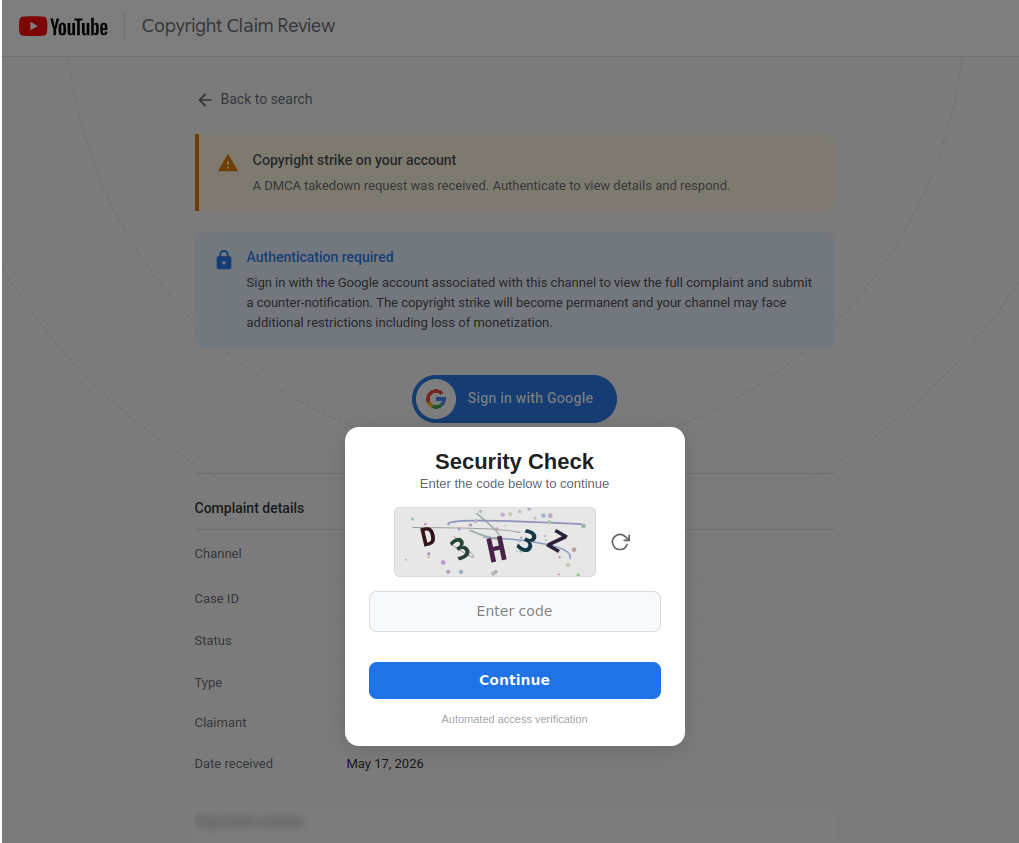
The victim clicks "Sign in with Google". First up we have a CAPTCHA to fly past:
And then we end up with a page which looks very much like a Chrome popup window with a Google sign-in form inside it - title bar, traffic-light buttons, address bar showing accounts.google.com/v3/signin/... with a green padlock. This is Browser-in-the-Browser, and it's well-known as a technique. What's less well-known is how far some kits are willing to take it.
Most BitB implementations I see go about as far as a static padlock that does nothing when you click it. This one goes further. Click the padlock and a fake Chrome site-information panel slides out - the same multi-page card you get when you click a real padlock, with rows for "Connection is secure", "Cookies and site data", and "Site settings". They're navigable. Drill into the security row and there's a "Certificate is valid" entry. Click that and a Certificate Viewer dialog opens, showing *.google.com, "Google Trust Services" as the issuer, an issue date randomised within the last 60 days, an expiry exactly 90 days later (Google's real cert lifetime), and a SHA-256 thumbprint that's 64 hex digits of Math.random(). Refresh and click again and the thumbprint is different. None of it is real. All of it is generated client-side on the fly, because somebody, somewhere, will click the padlock to check, and the operator has decided that in their kit they are going to raise the bar and hopefully successfully convince that "somebody" to enter their credentials.
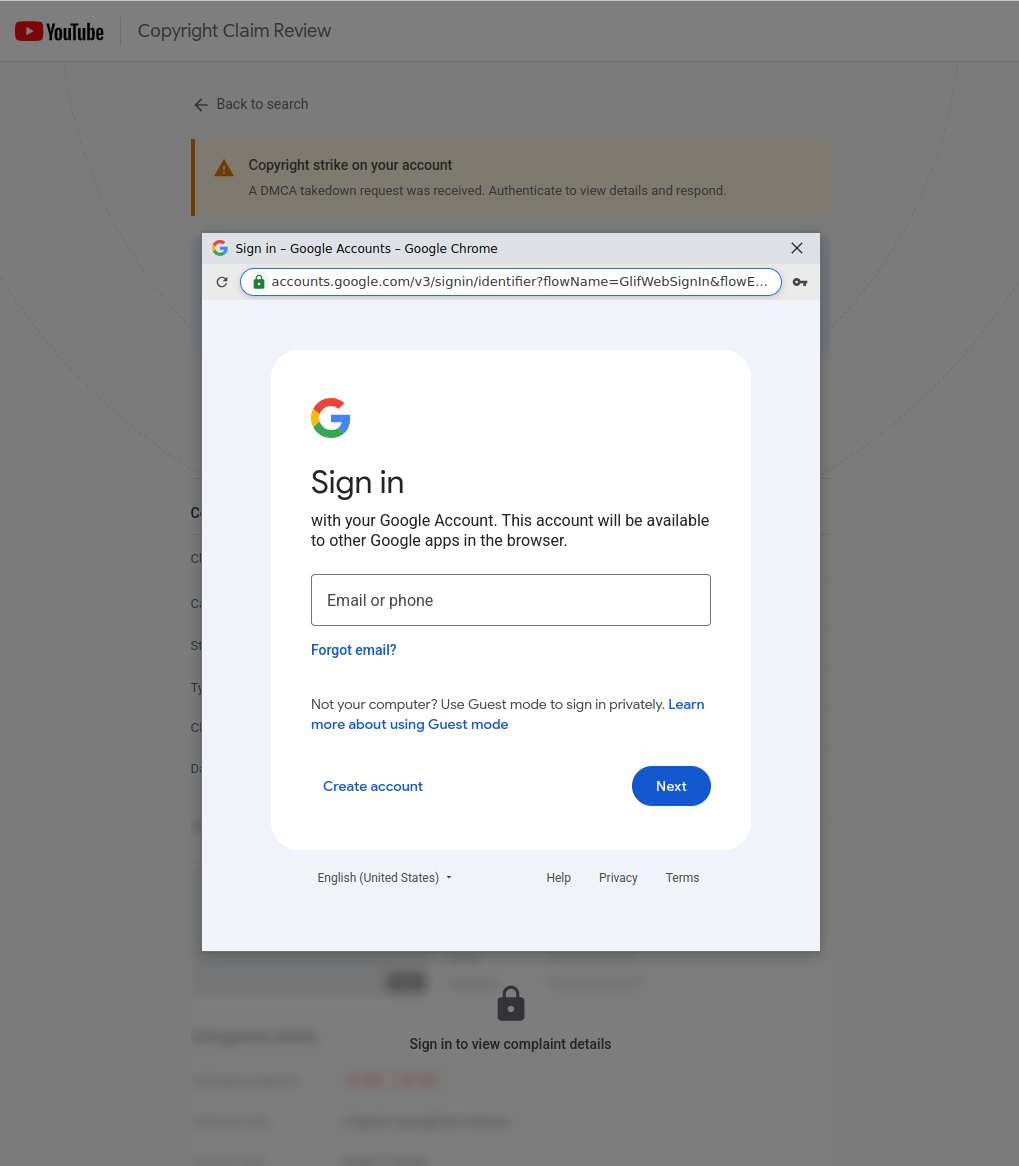
The whole sign in setup - title bar, toolbar, sign-in form, fake certificate flyout, OS-specific window chrome that adapts to whether you're on Windows, macOS, Firefox, or Opera - is HTML and JavaScript running on the lure domain. It's well crafted We'll look at how the sign in component works in more detail in Part 2 (coming very soon).